
Academy guides · 8 min read
How to Run Sports Academy Attendance Without Registers
Paper registers get lost, smudged and miscounted. Here is a simple way to take attendance for every batch from your phone, with a free attendance app for coaches and a routine your team will actually follow.

If your academy still runs on a paper register, you already know the problems. The book is left at home on the day you need it. Pages get wet at the ground. Someone has to count the ticks at the end of the month. And when a parent asks, "Was my child here last week?", the honest answer is, "Let me check the register tomorrow."
This guide shows how to run sports academy attendance without registers: what to record, how to set it up in an attendance app for coaches, and a simple routine that keeps the record accurate. It is written for academy owners and coaches in India who run batches of cricket, football, badminton or any other sport.
Why paper registers fall short
- One copy only. If the register is lost or damaged, the record is gone.
- One person can see it. Only the coach holding the book knows who attended.
- Patterns stay hidden. Counting weeks of ticks by hand takes time, so it rarely happens.
- Athletes and parents cannot check. They have to ask, and wait.
- Everyone marks differently. P, A, L, a tick or a dash can mean different things to different coaches.
A sports team attendance app solves the storage and visibility problems. It does not fix habits, so the routine later in this guide matters as much as the tool.
What to record for every session
Whatever you use, every attendance record should answer four questions: which batch, which date, which athlete, and what status. In FAB SPORTS, each athlete in a batch gets one of four statuses:
- Present: the athlete attended the session
- Absent: the athlete did not attend
- On Leave: the athlete or parent told you in advance, for example because of illness or exams
- On Tournament: the athlete was away at a match or tournament
The last two matter. A player who is away at a tournament is not absent in the way a no-show is, and mixing them up makes a committed child look careless in the record.
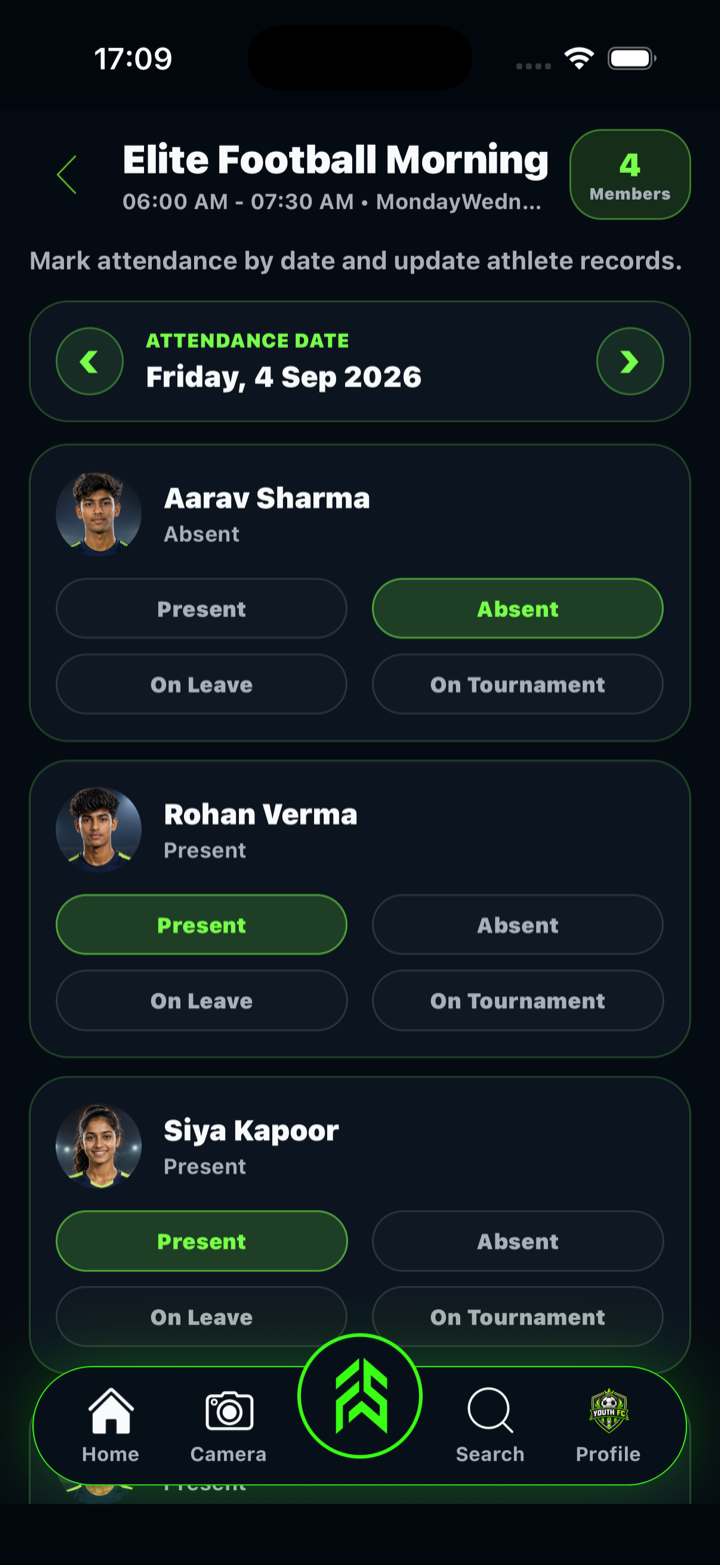
How to take attendance in FAB SPORTS, step by step
FAB SPORTS is a free sports app for athletes, parents, coaches and academies in India, and Attendance is one of its academy tools. This is the flow from first batch to saved record.
1. Create a batch
Open Attendance and tap Create New Batch. Give the batch a name, such as "U-12 Morning", set the start and end time and select the training days. A batch is one group that trains together at the same time, so a Monday, Wednesday and Friday 6:00 to 7:30 AM group is one batch. You can edit or delete a batch later.
2. Bring your players in
Players appear under Total Members after they buy a package from your academy or after you accept their connection. Tap Assign Batch next to each member, choose the batch and save. If plans change, Update Batch moves the member to another batch.
3. Open the batch on training day
Tap the batch. You will see the date, the batch timing and every member assigned to it. The arrows beside the date move to the previous or next training day of that batch, so you do not have to hunt for the right date.
4. Mark each athlete
Every athlete has four buttons: Present, Absent, On Leave and On Tournament. Tap one. Tap the same button again to clear it, and the athlete goes back to "Not marked yet", which is useful when you are waiting for a latecomer.
5. Save, and fix mistakes
Tap Update Attendance to save. Athletes in the batch get an Attendance updated notification in the app. If you spot a mistake, open the same date, change the status and tap Update Attendance again. Attendance is saved to your academy's account online, so you need an internet connection at this step.
6. Check a player's details when you need them
Tap Details on a player's card to see the details the athlete or parent has saved, including the parent consent form if it has been submitted. It is a quick check before a tournament trip or when a child is unwell.
7. Let athletes see their own record
Connected athletes and parents can open their saved attendance by date in the app under My Connects, so a question about last week's session does not need a call to the coach.
A simple routine that keeps attendance accurate
- Mark at the start of the session, when everyone is in one place, not from memory afterwards.
- Give each batch one owner. Even when several coaches are present, one person marks and saves.
- Use the four statuses the same way every time. Share a short note with all coaches on what each one means.
- Save before you leave the ground. An unsaved list is the same as no list.
- Only mark days when the batch really trains. Holidays and cancelled sessions should not create false absences.
- Review once a week. Look for athletes who have missed two sessions in a row and message their parents.
Use attendance to start conversations, not to punish
Attendance is most useful when it prompts a conversation. A player who has missed two weeks may be injured, busy with exams or losing interest, and a short message to the parent usually tells you which. Keep your leave and refund rules written down, as covered in our guide on managing sports academy fees and payments, so that attendance records and fee decisions stay fair. Our academy attendance guide and athlete progress tracking guide show how to connect attendance with training plans and progress.
Track coach and staff attendance too
Academies also need a record of their own team. In the staff section of Manage Finance, Staff Attendance lets you mark each staff member Present, Absent, On Leave or Half Day for a date, save it and review the saved records month by month. That makes month-end salary conversations simpler, because the record is already there.
What to look for in a sports attendance app
Before you switch from paper, check that the app supports the way your academy actually trains:
- Batches with fixed days and times, so the right list opens on the right day
- Statuses that match real life, including leave and tournaments, not only present or absent
- A record you can correct after saving
- Access from the phone you already carry to the ground
- Records stored online, so they are not lost with one phone or one notebook
- No subscription or hidden charges
Be realistic too. In FAB SPORTS the coach marks each athlete: there is no QR-code or biometric check-in, and saving needs an internet connection. For most academies, tapping through a batch list is still faster and more reliable than a paper register.
Attendance without registers: quick checklist
- One batch created for each training group, with days and times
- Every member assigned to the right batch
- One coach responsible for marking each batch
- Attendance marked at the start and saved before leaving
- Present, Absent, On Leave and On Tournament used the same way by all coaches
- A weekly look at athletes who keep missing sessions
How FAB SPORTS helps academies
Attendance works best when it sits next to the rest of your academy work. With FAB SPORTS on iOS, Android and the web, you can:
- Set up an academy profile so nearby players and parents can find you
- Organise batches and record attendance by batch
- Share a weekly training plan
- Create academy packages, and track Pay Directly purchases in Cash Collection
- Add staff, mark staff attendance and keep a record of income and expenses
- Record performance updates for players
Every FAB SPORTS tool is free, with no subscription. Academy fees and product prices are set by the academies and sellers, not by FAB SPORTS. See the sports attendance app page and the academy tools for more.
Conclusion
Running attendance without registers comes down to a few habits: one batch per group, one owner per batch, clear statuses, marking at the start and saving before you leave. Do that and you will always know who trained, who is away and who needs a call, without carrying a notebook to the ground.
Ready to take attendance from your phone? Download FAB SPORTS free on the App Store or get it on Google Play.
Frequently Asked Questions
How do I take attendance in a sports academy without registers?
Create a batch for each training group, assign your players to it, open the batch on training day, mark each athlete and save. In FAB SPORTS you do this from the Attendance tool on your phone, and you can correct a saved record later.
Is there a free app for sports training attendance?
Yes. FAB SPORTS offers free tools for academies and coaches in India, including batches and attendance. There is no subscription. Academy fees and product prices are set by academies and sellers, not by FAB SPORTS.
Which attendance statuses can I use?
For athletes, FAB SPORTS has four statuses: Present, Absent, On Leave and On Tournament. For academy staff, the statuses are Present, Absent, On Leave and Half Day.
Can I change attendance after I save it?
Yes. Open the batch, go to the same date, change the status and tap Update Attendance. The updated record replaces the earlier one for that date.
Does the attendance app work offline?
Attendance is saved to your academy's account online, so you need an internet connection when you tap Update Attendance. If the signal is poor at the ground, take quick notes and save the record once you are back online.
Can athletes and parents see their attendance?
Yes. Connected athletes get an Attendance updated notification when you save, and they can review their saved attendance by date in the app under My Connects.